
Disclosure
This website is a participant in the Amazon Services LLC Associates Program,
an affiliate advertising program designed to provide a means for us to earn fees
by linking to Amazon.com and affiliated sites.
This guide provides the definitive voltage chart and measurement guide. Understanding your battery’s precise charge level is critical for performance and longevity.
An accurate state of charge chart prevents damage from over-discharging and helps optimize your power system. It is the key to reliable energy for solar, RVs, and marine applications.
Best Tools for Monitoring LiFePO4 Battery State of Charge
Accurately reading your battery’s voltage requires the right tools. These three recommended devices provide reliable data for use with your state of charge chart, ensuring you never guess your battery’s health.
Victron Energy SmartShunt 500A – Best Overall Monitor
The Victron SmartShunt is the best option for precise, Bluetooth-enabled monitoring. It tracks state of charge via current integration (Ah counting), not just voltage, for superior accuracy. It’s ideal for permanent solar or RV installations where reliable, app-based data is crucial.
Klein Tools MM325 Multimeter – Best Budget Meter
For a direct voltage check, the Klein Tools MM325 is a trusted and affordable digital multimeter. It provides accurate DC voltage readings to tenths of a volt, essential for using a voltage-based SOC chart. This is the ideal tool for quick, manual checks on any 12V LiFePO4 system.
Renogy 500A Battery Monitor – Best Value with Display
The Renogy Monitor offers excellent value with a dedicated, easy-read screen. It displays voltage, current, and state of charge percentage calculated from amp-hours. This model is perfect for users who want a permanent, wired display without relying solely on a smartphone app.
LiFePO4 Battery Voltage Chart
A LiFePO4 state of charge chart maps voltage to remaining capacity. This relationship is not linear, making the chart essential. Understanding it prevents damaging deep discharges and optimizes charging cycles.
Key Voltage Points for a 12V LiFePO4 Battery
A 12V LiFePO4 battery is actually a 12.8V nominal system comprising four 3.2V cells in series. Its voltage changes significantly at the top and bottom of the charge curve.
- 100% SOC (Full Charge): Approximately 13.6V at rest. This is the absorption voltage after charging is complete.
- 50% SOC (Mid-Point): Around 13.2V. The voltage curve is very flat here, making precise SOC estimation difficult without a shunt.
- 0% SOC (Fully Discharged): Typically 10.0V. Discharging below this voltage risks permanent damage to the cells.
How to Read a LiFePO4 SOC Chart Accurately
For a voltage reading to be useful, the battery must be at rest. Follow this simple process for an accurate measurement.
- Disconnect All Loads and Chargers: Wait at least 30 minutes to let the surface charge dissipate.
- Measure Voltage: Use a calibrated digital multimeter across the battery terminals.
- Consult the Chart: Match your stable voltage reading to the corresponding state of charge percentage.
Key Takeaway: The most critical rule is to measure voltage at rest. A battery under load will show a temporarily lower “loaded voltage,” which does not reflect the true state of charge.
LiFePO4 vs. Lead-Acid: Voltage Comparison
Using a lead-acid voltage chart for a LiFePO4 battery is a major mistake. Their voltage profiles are fundamentally different.
| State of Charge | 12V LiFePO4 Voltage | 12V Lead-Acid (AGM) Voltage |
|---|---|---|
| 100% | 13.6V | 12.8V |
| 50% | 13.2V | 12.0V |
| 20% | 12.8V | 11.8V |
| 0% | 10.0V | 10.5V |
As shown, a LiFePO4 battery at 50% SOC has a much higher resting voltage than a lead-acid battery. This highlights the need for the correct chart.
How to Maintain Optimal LiFePO4 Battery Health
Proper maintenance extends your battery’s lifespan far beyond its warranty. Following best practices for charging and discharging is key. This ensures you get the maximum cycles from your investment.
Best Practices for Charging LiFePO4 Batteries
Use a charger specifically designed for lithium iron phosphate chemistry. This protects the battery from incorrect voltage settings. Follow these charging guidelines for safety and longevity.
- Use the Correct Voltage: Set your charger to 14.2V to 14.6V for absorption. The float charge should be disabled or set to 13.6V.
- Avoid Trickle Charging: Unlike lead-acid, LiFePO4 batteries do not need a float charge for storage. They have very low self-discharge.
- Monitor Temperature: Avoid charging in freezing conditions (<0°C / 32°F) unless your battery has a built-in low-temp cut-off.
Safe Discharge Limits and Depth of Discharge (DOD)
Depth of Discharge (DOD) indicates how much capacity you use. A 100% DOD means using all energy down to 0% SOC. Shallower discharges dramatically increase cycle life.
| Depth of Discharge (DOD) | Estimated Cycle Life | Recommended Use |
|---|---|---|
| 100% (to 10.0V) | 2,000 – 3,000 cycles | Avoid regularly |
| 80% (to ~12.8V) | 3,500 – 5,000 cycles | Good balance |
| 50% (to ~13.2V) | 6,000 – 8,000 cycles | Optimal for longevity |
For daily use, discharging to 80% DOD (20% SOC) offers an excellent balance of usable capacity and long life.
Key Takeaway: The single best practice is to avoid fully discharging your battery. Keeping it between 20% and 90% SOC will maximize its serviceable lifespan.
Long-Term Storage Voltage Settings
If storing your battery for months, set it to a 50-60% state of charge. This is approximately 13.2V to 13.3V for a 12V battery. Store in a cool, dry place and check voltage every 3-6 months.
Advanced Monitoring: Beyond Basic Voltage Readings
While a voltage chart is essential, it has limitations for dynamic systems. Advanced monitoring provides real-time, precise state of charge data. This is crucial for complex solar, RV, or marine power systems.
Why a Battery Monitor is More Accurate Than Voltage
The flat voltage curve of LiFePO4 batteries makes mid-range SOC estimation difficult. A dedicated battery monitor uses a shunt to measure current flow in and out. It calculates state of charge by tracking amp-hours (Ah), not just voltage.
- Eliminates Guesswork: Provides a precise percentage readout, even when the battery is under load or being charged.
- Tracks Net Energy: Accounts for all power consumed and replaced, offering a true picture of remaining capacity.
- Long-Term Calibration: High-quality monitors automatically recalibrate when the battery reaches full charge.
How to Calibrate Your Battery Monitoring System
For the most accurate readings, periodic calibration is necessary. This syncs the monitor’s software with your battery’s actual capacity. Follow this simple calibration process annually.
- Fully Charge the Battery: Use your LiFePO4 charger until it completes its absorption cycle and the current drops near zero.
- Reset the Monitor: Access your monitor’s settings (via app or button) and set the state of charge to 100%.
- Perform a Full Cycle: Use the battery down to a low SOC (e.g., 20%) and recharge fully to help the monitor learn the true capacity.
Key Takeaway: For any critical application, a battery monitor with a shunt is a worthwhile investment. It provides far more reliable and actionable data than voltage readings alone.
Interpreting Data Under Load and During Charging
Voltage readings are only valid at rest. When a load is applied, voltage temporarily sags. When charging, voltage rises. A quality monitor displays both resting voltage and loaded/charging voltage separately, giving you a complete diagnostic picture of your system’s health and performance.
Troubleshooting Common LiFePO4 SOC Issues
Even with a good chart, you may encounter confusing readings. These common issues have straightforward explanations and solutions. Understanding them prevents unnecessary worry or incorrect actions.
Why Your Battery Voltage Drops Quickly Under Load
A sudden voltage drop when you turn on an appliance is normal. This is called voltage sag and is not a true indicator of low state of charge. The voltage will recover once the load is removed.
- High-Current Draw: Inverters starting motors or microwaves pulling high watts cause significant, temporary sag.
- Undersized Cables: Thin wiring between the battery and device creates resistance, exaggerating the voltage drop.
- Normal Behavior: As long as the resting voltage recovers to a healthy level, your battery is fine.
Inaccurate Readings and How to Fix Them
If your voltage readings don’t match the expected state of charge chart, several factors could be at play. Systematically check these common culprits.
- Check for Parasitic Loads: Ensure all devices are off. Even a small LED can prevent the battery from reaching a true “at rest” voltage.
- Verify Your Meter: Test your multimeter’s accuracy on a known voltage source. Low batteries in the meter can cause incorrect readings.
- Test Cell Balance: In a 12V battery, use your meter to check each 3.2V cell. A large imbalance (>0.1V difference) indicates a failing cell or BMS issue.
Key Takeaway: Always diagnose based on resting voltage, not loaded voltage. If persistent discrepancies occur, test individual cell voltages and inspect all connections for corrosion or looseness.
When to Recalibrate or Replace Your Battery
Over time, a battery’s actual capacity will decrease slightly. If your fully charged battery reaches low voltage much faster than it used to, it may need recalibration. A consistent inability to hold above 13.0V at rest after a full charge may indicate it’s nearing end-of-life.
Essential LiFePO4 State of Charge Reference Tables
Quick-reference tables allow for fast, accurate assessment of your battery’s status. These charts account for different system voltages and provide clear benchmarks. Keep them handy for regular system checks.
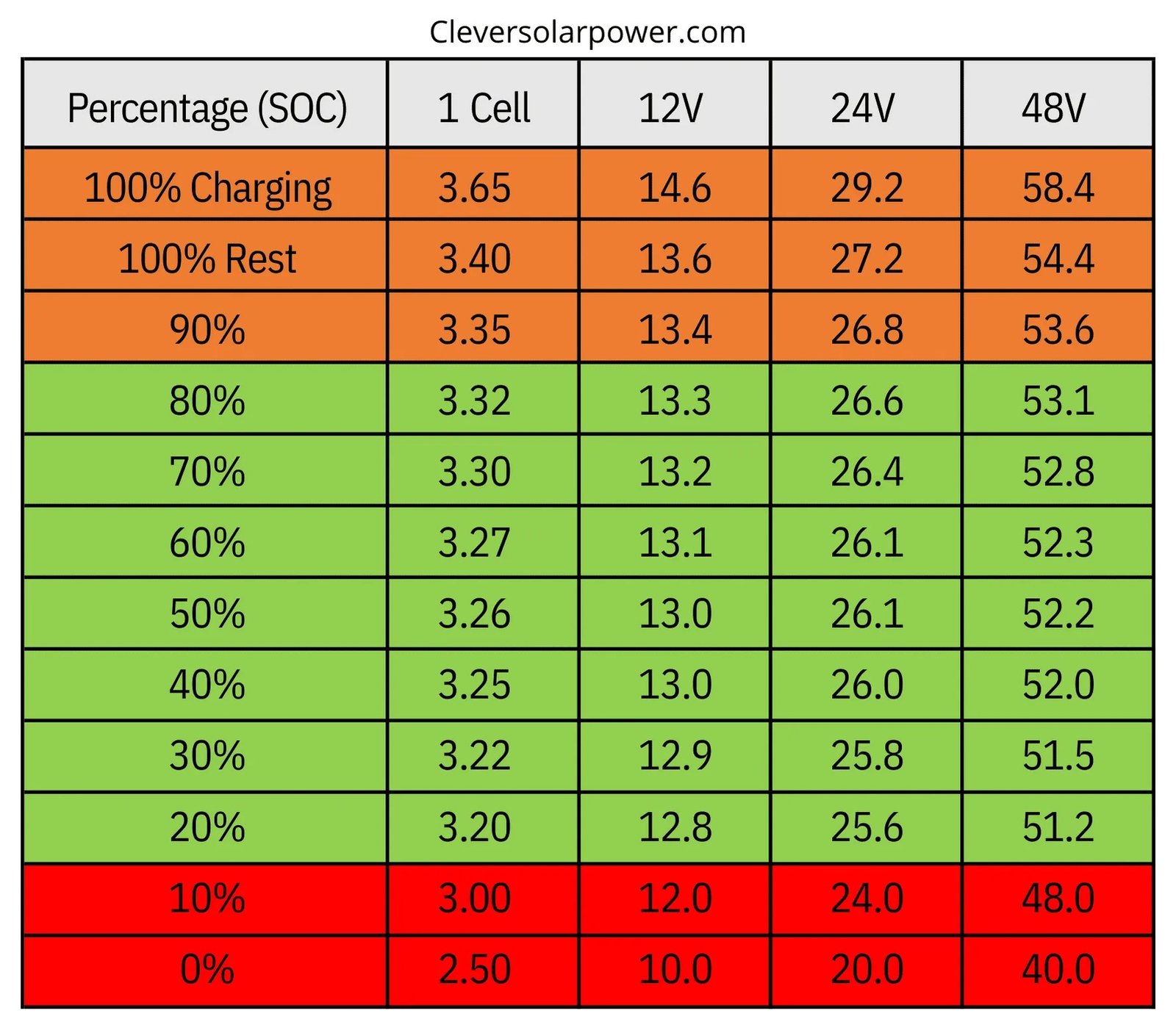
Complete 12V LiFePO4 Battery Voltage Chart
This is the definitive reference for a standard 12.8V nominal LiFePO4 battery. Voltages are for a fully rested battery at room temperature (approx. 77°F / 25°C).
| State of Charge (SOC) | Resting Voltage | Recommended Action |
|---|---|---|
| 100% | 13.6V | Storage or use; charging complete |
| 90% | 13.4V | Excellent daily high limit |
| 80% | 13.3V | Ideal for regular cycling |
| 50% | 13.2V | Mid-point; flat voltage curve zone |
| 20% | 12.8V – 12.9V | Recharge soon |
| 10% | 12.5V | Recharge immediately |
| 0% | 10.0V | Battery protection cut-off; avoid |
Voltage Charts for 24V and 48V Systems
For higher voltage systems, simply multiply the 12V values by the number of 12V blocks in series. Accuracy depends on all cells being well-balanced.
- 24V System (2x 12V in series): Double the 12V voltage. 100% SOC = ~27.2V, 50% SOC = ~26.4V, 0% SOC = 20.0V.
- 48V System (4x 12V in series): Quadruple the 12V voltage. 100% SOC = ~54.4V, 50% SOC = ~52.8V, 0% SOC = 40.0V.
Always confirm the specific voltage parameters with your battery’s manufacturer, as slight variations exist.
Key Takeaway: The 20% to 90% SOC range (12.8V to 13.4V) is the sweet spot for daily use. Operating within this band maximizes both usable capacity and long-term cycle life.
Temperature Compensation Considerations
Battery voltage is affected by temperature. A cold battery shows a slightly lower voltage for the same state of charge. A hot battery shows a slightly higher voltage. For precise measurement, allow the battery to stabilize at room temperature before taking a final reading.
Pro Tips for Maximizing LiFePO4 Battery Lifespan
Following the voltage chart is just the start. Implementing these expert strategies will ensure you get the maximum value and performance from your battery. Proactive care prevents premature aging and failure.
Optimal Charging and Storage Strategies
Daily charging habits significantly impact long-term health. Avoid the common mistake of always charging to 100% if it’s not needed.
- Partial Charging is Beneficial: For daily cycling, charging to 90% (13.4V) reduces stress on the cathode, extending life.
- Store at Partial Charge: For seasonal storage, a 50-60% SOC (13.2V-13.3V) is ideal. Store in a cool, dry location.
- Perform Occasional Full Balances: Every few months, allow a full charge cycle to 100% to let the Battery Management System (BMS) balance the cells.
The Role of the Battery Management System (BMS)
Your battery’s built-in BMS is its guardian. It manages critical safety and longevity functions automatically. Understanding its role helps you trust its operations.
- Cell Balancing: The BMS ensures all individual cells charge and discharge evenly, preventing weak links.
- Over/Under Voltage Protection: It disconnects the battery if voltage goes too high (overcharge) or too low (over-discharge), using the state of charge chart’s limits.
- Temperature Monitoring: A good BMS will halt charging if cells are too cold and limit current if they are too hot.
Key Takeaway: Trust your BMS but verify its settings. Ensure your external charger’s voltages align with your BMS’s cut-off points to avoid constant protection triggers.
Regular Maintenance and Health Checks
A simple monthly check-up can catch issues early. This routine takes only minutes but provides immense peace of mind and data for trend analysis.
Record the resting voltage and ambient temperature. Visually inspect terminals for tightness and corrosion. This log will help you spot gradual capacity loss or other anomalies before they become critical failures.
Applying Your SOC Knowledge: Real-World Scenarios
Understanding the state of charge chart is theoretical until applied. These common scenarios show how to use your knowledge in practical situations. This ensures reliable power when you need it most.
Planning for a Weekend RV or Boating Trip
Proper power planning prevents a dead battery far from shore or a campground. Use your SOC chart to calculate energy needs before you depart.
- Calculate Your Load: List all appliances (fridge, lights, pump) and estimate their daily watt-hour or amp-hour consumption.
- Check Starting Capacity: Before leaving, ensure your battery is at 100% SOC (13.6V). This is your full energy reservoir.
- Set a Daily Minimum: Plan to never discharge below 30-40% SOC (~13.0V). This provides a safety buffer for unexpected use or poor solar harvest.
Managing Solar Power Systems Effectively
In off-grid solar, the battery is your energy bank. The state of charge is your bank balance. Smart management maximizes self-sufficiency.
- Morning Check: A low resting voltage (e.g., 12.9V) indicates high overnight use. Conserve power if cloudy weather is forecast.
- Evening Target: Aim to end the solar charging day at 80-90% SOC (13.3V-13.4V). This minimizes depth of discharge overnight.
- Generator Backup Rule: Set a trigger voltage, like 12.7V (approx. 25% SOC), to automatically start a backup generator and prevent deep discharge.
Key Takeaway: In any application, treat 12.5V (10% SOC) as your “red line.” Recharging should begin immediately at this point to protect the battery from damage.
What to Do When Your Battery is Deeply Discharged
If your battery is below 10V, the BMS has likely disconnected it to prevent damage. First, attempt a recharge with a compatible LiFePO4 charger. If the BMS does not reactivate, some chargers have a “wake-up” or “recovery” mode that applies a small voltage to reset the system. Consult your battery and charger manuals for specific recovery procedures.
Conclusion: Mastering Your LiFePO4 Battery State of Charge
An accurate state of charge chart is your most important tool for LiFePO4 battery management. It empowers you to prevent damage and maximize lifespan. Proper voltage interpretation ensures reliable power for all your needs.
The key takeaway is to operate within the 20% to 90% SOC range for daily use. Combine voltage readings with a quality battery monitor for the best accuracy. This proactive approach saves money and prevents failures.
Start by downloading our reference chart and checking your system’s resting voltage today. Invest in one of the recommended monitoring tools for peace of mind. Proper care ensures your battery delivers thousands of reliable cycles.
You now have the expert knowledge to manage your energy storage with confidence. Your LiFePO4 investment is protected.
Frequently Asked Questions about LiFePO4 State of Charge
What is the best state of charge to store a LiFePO4 battery long-term?
For long-term storage, the ideal state of charge is 50-60%. This corresponds to a resting voltage of approximately 13.2V to 13.3V for a 12V battery. Storing at this mid-level minimizes chemical stress on the cells.
Store the battery in a cool, dry place away from direct sunlight. Check the voltage every three to six months and give it a top-up charge if it drops below 30% SOC (around 13.0V).
How do you check the state of charge on a LiFePO4 battery?
The most reliable method is using a dedicated battery monitor with a shunt. For a quick check, use a digital multimeter on the battery terminals after it has rested with no load or charge for at least 30 minutes.
Compare the stable resting voltage to a LiFePO4-specific state of charge chart. Remember, voltage readings taken while the battery is powering a device (under load) will be inaccurate and show a lower voltage.
Why is my LiFePO4 battery voltage different from the chart?
Differences usually occur because the battery is not at rest. A load or charger connected will change the voltage reading. Temperature also affects voltage; a cold battery reads lower for the same SOC.
Ensure all loads are disconnected and wait. Also, verify your multimeter’s accuracy. If discrepancies persist at rest, individual cell imbalance within the battery pack could be the cause.
What voltage is 50% charge on a 12V LiFePO4 battery?
A 12V LiFePO4 battery at 50% state of charge will show a resting voltage of approximately 13.2 volts. It is critical to note that the voltage curve is very flat between 20% and 80% SOC.
This flat curve means voltage alone is an imprecise measure in this range. A variation of just 0.1V can represent a significant capacity difference, which is why a battery monitor is recommended for precision.
Can I use a lead-acid battery charger on my LiFePO4 battery?
You should not use a standard lead-acid charger. Its higher absorption and float voltages can overstress LiFePO4 cells. Always use a charger specifically designed for lithium iron phosphate chemistry.
A proper LiFePO4 charger will have the correct voltage profile (typically 14.2V-14.6V absorption) and will not use a continuous trickle or float charge, which can degrade lithium batteries over time.
How often should I fully charge my LiFePO4 battery?
For daily cycling, you do not need to charge to 100% every time. Charging to 90% can extend battery life. However, it is good practice to perform a full 100% charge every few weeks or months.
This full charge cycle allows the battery’s internal Battery Management System (BMS) to actively balance the individual cells, ensuring they all remain at equal voltage and capacity.
What is the lowest safe voltage for a LiFePO4 battery?
The lowest safe resting voltage before damage risk increases is typically 10.0 volts for a 12V battery. In practice, you should never intentionally discharge below 20% SOC (about 12.8V).
Your battery’s BMS should automatically disconnect the load at the low-voltage cut-off (around 10V) to prevent a damaging deep discharge. Relying on this emergency cut-off regularly will shorten the battery’s life.
Is it bad to leave a LiFePO4 battery at 100% charge?
While more tolerant than other lithium chemistries, keeping a LiFePO4 battery at 100% state of charge (13.6V) for extended periods can still cause slight stress. For maximum longevity, avoid continuous float charging.
If the battery is in active use, 100% is fine. For storage longer than a week, the best practice is to lower the SOC to the 50-60% range to minimize long-term degradation.